
Mar 29
Warren Potter
I came across Hozy while scrolling through upcoming Steam releases, and something about it made me stop. No timers. No leaderboards. No one yelling at you to move faster. Just a quiet little town that needs some care, and you have the tools to give it exactly that. I had to write about it.
Here is everything you need to know about Hozy, from the story behind the game to how to download it and use your controller properly on day one.
What Is Hozy?
Hozy is a cozy room restoration and interior decoration game developed by Come On Studio and published by tinyBuild. It releases on Steam on March 30, 2026. The game puts you back in your small hometown after things fall apart in the big city. The town feels quiet and a little forgotten, but instead of feeling sad about it, you find something new to care about: fixing up these old spaces, one room at a time.
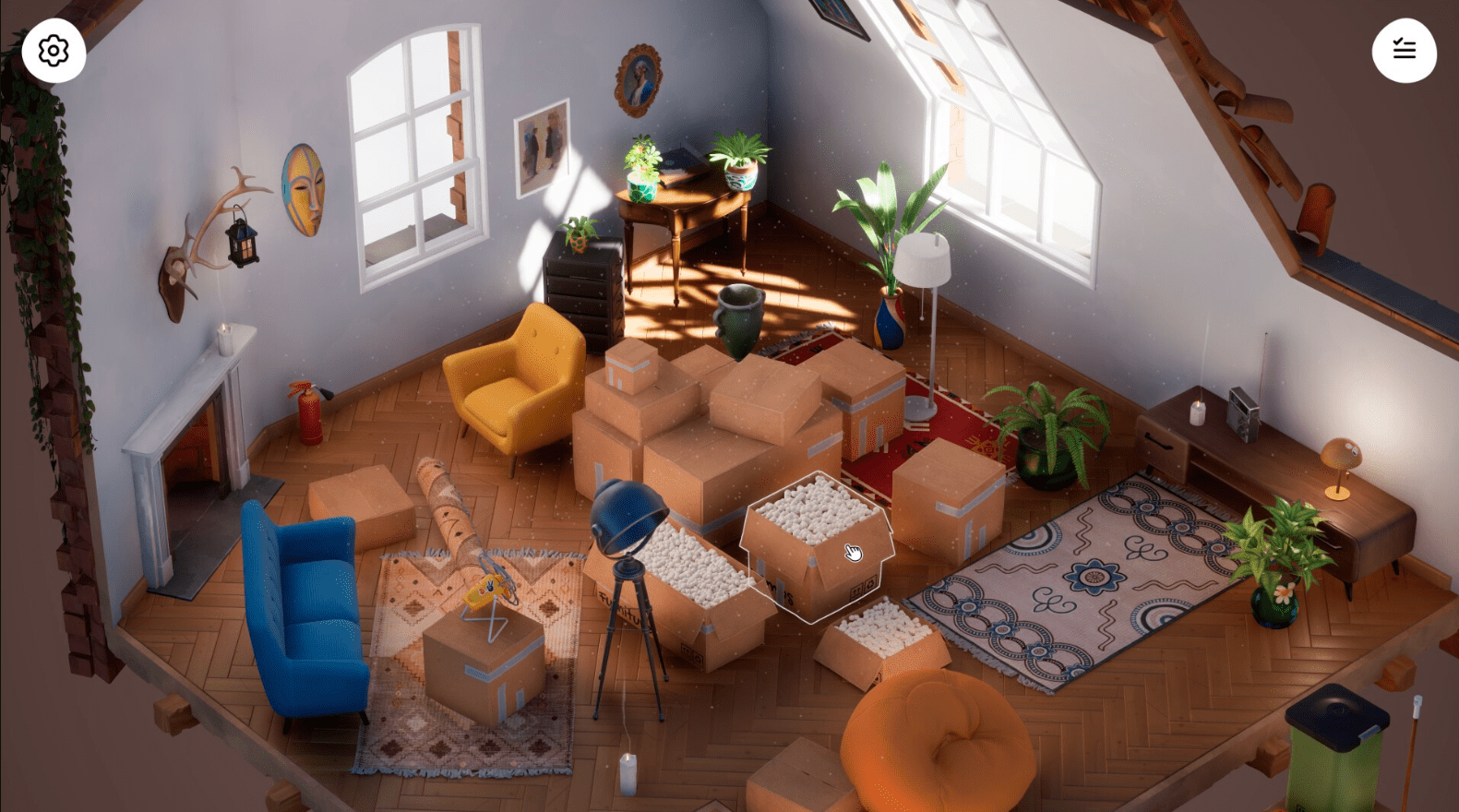
The core loop is simple. You clean dirty rooms, paint walls, rearrange furniture, and slowly bring each space back to life. That is it. And somehow, it is deeply satisfying.
There are no scores. No fail states. No stress. If you have ever cleaned up a room in real life and felt that quiet satisfaction when everything finally looks right, Hozy is trying to bottle that exact feeling.
The Story Behind the Spaces
What separates Hozy from a generic cleaning simulator is the storytelling hidden in each room. Every space you restore belongs to someone. The objects left behind, the colors on the walls, the worn furniture, all of it tells a story without spelling it out for you.
You start in your parents’ home. Then you step into an artist’s workshop. After that, an old café that feels like it has not changed in thirty years. There are nine unique locations in total, each with its own personality and history.
One of the later spaces connects to your father’s long-held dream of a peaceful place by the sea. I will not say more than that, but it hit differently than I expected from a game about mopping floors.
Gameplay Mechanics You Will Actually Use
Hozy keeps the gameplay tactile and grounded. You are not clicking through menus. You are grabbing tools and using them. Here is what that looks like in practice:
- Use a mop to clean dirty floors with sweeping motions
- Use a squeegee to wipe down windows until they are clear
- Use a crowbar to pull up old materials during renovation
- Paint walls by selecting a color and going over surfaces
- Place furniture freely anywhere in the room with no locked grid
- Rotate and reposition items until the layout feels right to you
- Open windows to let in air and natural sound effects
- Light candles, arrange books, hang art, switch on a projector
The physics on the cleaning mechanics are satisfying in a way that is hard to explain. Watching dirt disappear under your mop or a window go from foggy to clear gives you a small hit of accomplishment every few seconds. It adds up.
The furniture system avoids the trap of overwhelming you with choices. Instead of a catalogue with hundreds of options, Hozy gives you a curated set of items for each room that are designed to work well together. You still have full creative freedom in how you arrange them, but you are not spending forty minutes picking between similar-looking couches.
Atmosphere and Sound
The music was composed by Yann Van Der Cruyssen, the same person behind the soundtracks for Stray and Seasons After Fall. That should tell you something. The audio in Hozy is calm, warm, and never intrusive. It sits in the background the same way good background music should.
The ambient details go further than most games bother to go. When you open a window, dust floats and catches light. Birds come in from outside. The sound of the space changes. These are small things, but they are exactly the kind of small things that make a game feel alive instead of hollow.
Photo Mode
Once you finish restoring a room, you can use the built-in photo mode to capture your work. It includes filters and advanced camera controls, so you can actually compose a proper shot rather than just pressing a button and hoping for the best. If you enjoy sharing screenshots or just want to document what you built, the tools are there to do it well.
How to Download Hozy on PC via Steam
Hozy is available exclusively on Steam at launch. Follow these steps to get it on your PC:
- Open your browser and go to store.steampowered.com
- Search for “Hozy” in the search bar at the top
- Click on the Hozy store page from the results
- Click the green “Add to Cart” button or “Buy Now” if you are ready
- Complete your purchase through your Steam account
- Once purchased, go to your Steam Library
- Find Hozy in your library list on the left side
- Click “Install” and choose your installation folder
- Wait for the download to finish, then click “Play”
If you do not have Steam installed, download it first from the official Steam website. The client is free and takes a few minutes to set up.
Note: As of January 1, 2024, Steam only supports Windows 10 and newer. If you are on Windows 8.1, you will need to upgrade before installing.
System Requirements for Hozy on PC
Before you download, make sure your PC can run it. Here are the official system requirements:
Minimum Requirements
- OS: Windows 10 64-bit
- Processor: Intel Core i3-2100T or AMD FX 6100
- RAM: 8 GB
- Graphics: Nvidia GeForce GTX 660 or AMD R7 260x
- DirectX: Version 11
- Storage: 5 GB available space
Recommended Requirements
- OS: Windows 10 64-bit
- Processor: Intel Core i5-3570K or AMD Ryzen 3
- RAM: 16 GB
- Graphics: Nvidia GeForce GTX 980 or AMD R9 290X
- DirectX: Version 12
- Storage: 5 GB available space
Hozy is not a demanding game visually. If you have a mid-range PC from the last five years, you should be fine on recommended settings without any issues.
Full Controller Button Layout Guide for PC and Xbox
Hozy supports controller input natively, and playing with a gamepad feels natural for this type of game. The pace is slow and deliberate, so there is no penalty for using a controller over mouse and keyboard. Here is the complete layout based on the Xbox controller scheme, which also applies when using an Xbox controller on PC via Steam.
Movement and Camera
| Input | Action |
|---|---|
| Left Stick | Move your character around the room |
| Right Stick | Rotate the camera to look around |
| Left Stick Click (L3) | Sprint or move faster |
| Right Stick Click (R3) | Reset or center the camera |
Tool and Item Interaction
| Input | Action |
|---|---|
| A Button | Interact with objects, pick up items, confirm actions |
| B Button | Cancel, drop held item, exit current menu |
| X Button | Use active cleaning tool (mop, squeegee, brush) |
| Y Button | Rotate held furniture item |
| Right Trigger (RT) | Apply tool action (paint, clean, scrub) |
| Left Trigger (LT) | Zoom in or focus on selected area |
| Right Bumper (RB) | Cycle through available tools |
| Left Bumper (LB) | Open the furniture and décor selection menu |
Menu and Interface Controls
| Input | Action |
|---|---|
| Start / Menu Button | Open the pause menu |
| Back / View Button | Open the photo mode |
| D-Pad Up | Open your task or objective list |
| D-Pad Down | Toggle ambient sound effects or music |
| D-Pad Left / Right | Cycle between color or material options during painting |
Photo Mode Controls
| Input | Action |
|---|---|
| Right Stick | Adjust camera angle in photo mode |
| Left Stick | Move the camera position |
| RT | Take the photo |
| RB / LB | Cycle through available filters |
| Y Button | Toggle UI visibility for a clean shot |
| B Button | Exit photo mode |
Tip for PC players: If you connect an Xbox controller via USB or Bluetooth on Windows, Steam will detect it automatically. Go to Steam Settings, then Controller, then General Controller Settings, and make sure Xbox Configuration Support is turned on. Hozy will then recognize your controller without any additional setup.
For a broader look at how Steam handles controller support across games, you can visit the official Steam controller support documentation.
Who Should Play Hozy?
If you enjoy games like PowerWash Simulator, Unpacking, or House Flipper but want something even more relaxed and story-driven, Hozy is built for you. It does not demand your full attention. You can play it after a long day when your brain is tired and you just want something that feels good without requiring much from you.
It also works well if you enjoy interior design in real life. The curation of furniture and the freedom to arrange rooms however you want scratches a similar creative itch without the cost or commitment of actual decorating.
That said, if you need constant stimulation, goals, or competition to stay engaged, this probably is not for you. Hozy is slow on purpose. It respects your time by not wasting it on urgency.
Developer and Publisher
Hozy is developed by Come On Studio and published by tinyBuild. tinyBuild has published other well-known indie titles and has a track record of backing games that value creativity and player comfort over mass-market appeal. You can find more about their catalogue on the official tinyBuild website.
Frequently Asked Questions About Hozy
Is Hozy free to play?
No, Hozy is a paid game available on Steam. Pricing has not been officially confirmed at the time of writing, but it is expected to fall in the range typical for indie games of this type. Check the Steam page for the current price.
Does Hozy have multiplayer?
No. Hozy is a single-player experience. The entire game is built around a calm, solo restoration journey. There is no co-op or competitive mode.
How many levels or rooms does Hozy have?
Hozy has nine unique locations to restore. Each one has its own visual style, story, and set of curated furniture and décor.
Can I replay rooms after I finish them?
Yes. One of the features highlighted by the developer is replayability driven by creative freedom. Since there is no single correct way to arrange a room, you can go back and redesign spaces however you like.
Does Hozy support Xbox controller on PC?
Yes. Hozy supports Xbox controllers on PC through Steam. Connect your controller before launching the game and Steam will handle the rest automatically.
Is Hozy available on console?
At launch, Hozy is confirmed for PC via Steam only. Console versions have not been announced officially as of March 2026.
What makes Hozy different from House Flipper?
House Flipper focuses more on buying, renovating, and selling properties with a business layer underneath. Hozy removes all of that. There is no economy, no clients, and no pressure. The focus is purely on the act of restoration and decoration itself, making it a slower and more personal experience.
Who composed the music for Hozy?
The soundtrack was composed by Yann Van Der Cruyssen, who also created the music for Stray and Seasons After Fall. Both of those soundtracks are widely praised, so expectations for Hozy’s audio are high.
Does Hozy require an internet connection?
Hozy is a single-player game and should not require a constant internet connection after the initial download through Steam. However, Steam’s standard offline mode settings apply.
What is the storage size for Hozy?
You need 5 GB of available storage space to install Hozy, according to the official system requirements.
Download Links
If you are facing any issue in downloading or need assistance Click here .